Assigning machines to a company profile
Workflow Setting up dentalcnc machines.
To be able to use machines with dentalcnc, they must be assigned to your myvhf company profile. This also ensures accurate manufacturing statistics in myvhf.
-
Information for vhf partners Machines must be assigned to the profile of the operating company. The registration buttons will not be displayed if your vhfid is marked as "service personnel."
-
These instructions also apply when a machine is reassigned, for example, after the purchase of a used machine. Reassigning an item automatically overwrites the existing assignment.
If the machine is assigned to a company profile that does not belong to your company, this has the following disadvantages:
-
The members of the machine's company profile can monitor machine usage.
-
The machine does not contribute to the statistics for your myvhfcompany profile.
Prerequisites
-
You are signed in dentalcnc as a Company administrator.
- You are not signed in as service personnel in dentalcnc.
-
You have selected the desired machine from the machine list.
-
In the Queue section, select the Assign machine button and confirm your selection.
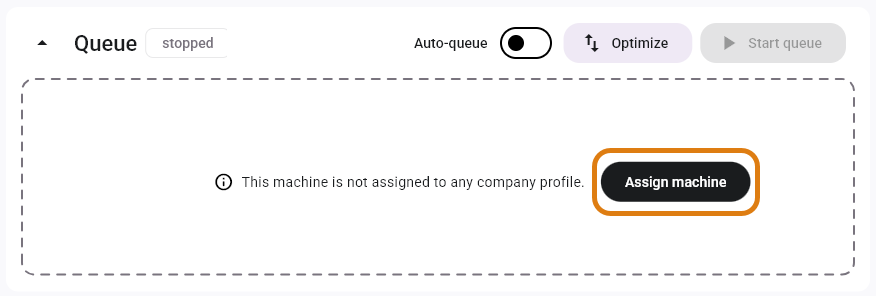
-
Alternative: If the queue contains a job that you do not want to remove:
-
Open the Machine data view with the following icon in the Main icon bar:

-
Select the Sign in machine button in the lower-right corner.
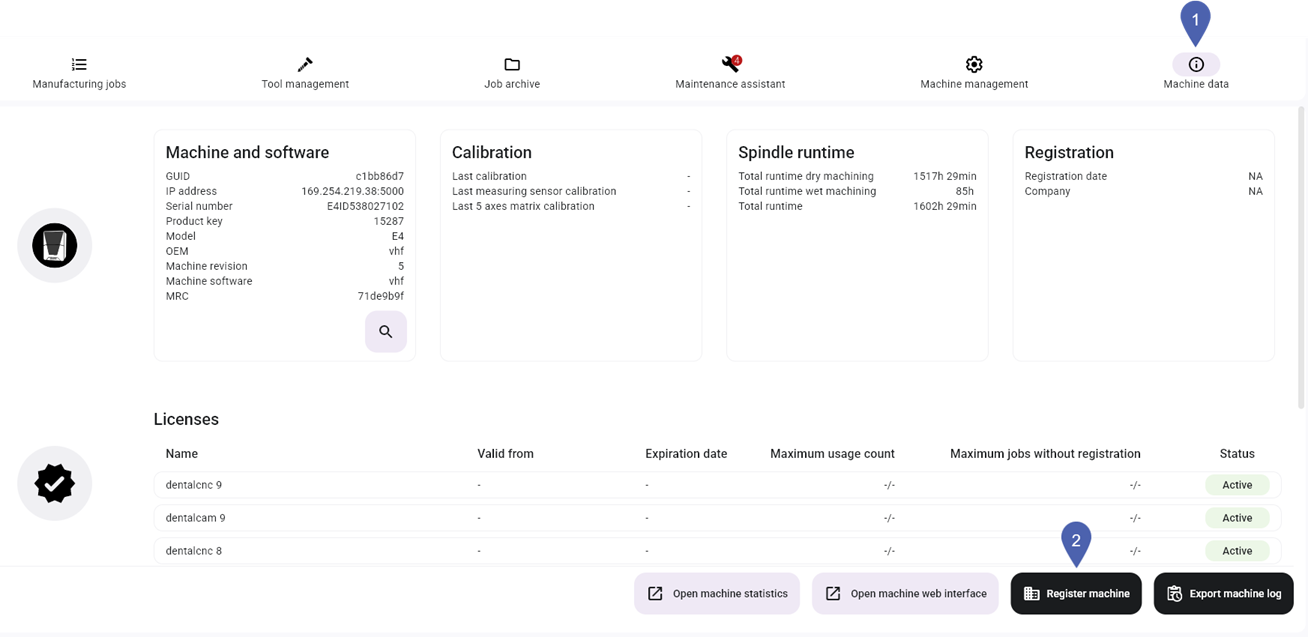
-
-
dentalcnc assigns the machine. You will receive a confirmation email.
 Troubleshooting
|
Error |
Possible cause |
Recommendation |
|---|---|---|
|
The button to sign in the machine is missing. |
You are not a company administrator. |
|
|
The machine has already been assigned to the company profile of your vhfid. |
|
|
|
You are signed in as service personnel. |
|


