Signing in to dentalcnc

Workflow Setting up dentalcnc machines.
You must sign in with your vhfid in dentalcnc to use the device.
-
dentalcnc automatically signs in the last signed in vhfid at startup.
-
The registration must be renewed regularly.
Watch the video

Vimeo video – When viewing this video, personal data is sent to Vimeo Inc., USA. Privacy statement
Prerequisites
-
You have a vhfid.
-
No other users are currently signed in dentalcnc .
- Start dentalcnc.
-
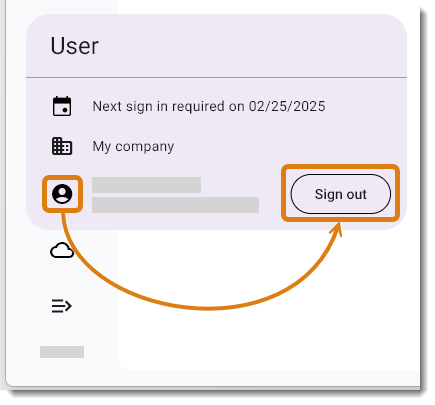
If another user has signed in, please sign them out:
-
In the system menu, select the following icon:

-
Select the Log out button.
-
-
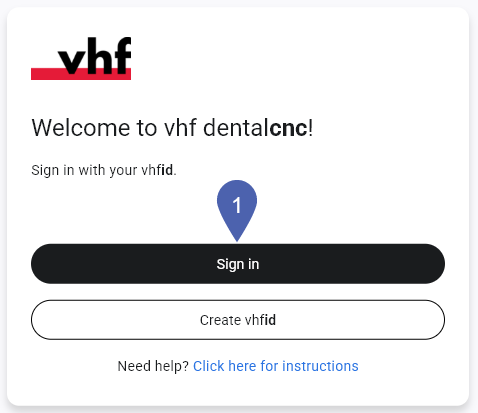
On the welcome screen, select Sign in.
-
dentalcnc opens your default browser and goes to the login page.
-
Enter your vhfid credentials.
-
Select Sign in.
-
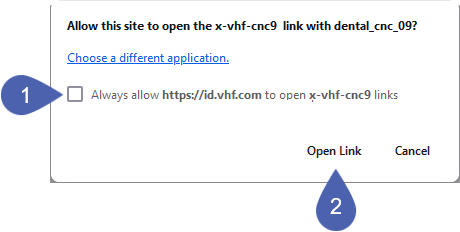
Your browser may ask if it can open the dentalcnc website.
-
Recommendation: Save your answer by activating the check box. This speeds up future sign-ins via the browser.
-
Confirm that you want to open with dentalcnc.
-
dentalcnc moves to the foreground. If the user signs in successfully, the program will search the network for known machines.


