Unlocking service mode for service personnel

Access to service mode in dentalcnc 9 is linked to your vhfid. You can request access via myvhf, provided your vhfid is associated with a reseller or service partner.
-
A company administrator creates the company profile in myvhf and adds the vhfids of the service personnel.
-
Service personnel must submit an individual request for access to service mode.
Workflow Overview
Company administrators
Requirement You have an overview of myvhf. See Overview of vhfid, myvhf, vhf Cloud.
-
Create a vhfid. See Creating a vhfid.
-
Create a company profile as a reseller or service partner. See Creating a myvhf company profile.
-
Add the members of the service personnel to the company profile. See Adding team members to a myvhf company profile.
Service personnel
Prerequisites
-
To request access Your company administrator has already created the company profile in myvhf and added your vhfid. You can submit your application immediately after creating your company profile, without waiting for vhf to validate it.
-
To grant access The company profile linked to your vhfid has been verified as a reseller or service partner of vhf.
-
Create a vhfid. See Creating a vhfid.
-
Please provide your company administrator with the email address you used to sign in your vhfid.
-
Accept the invitation sent to you by email from your company administrator.
-
Open the myvhf myvhf website
If necessary, sign in using your vhfid.
-
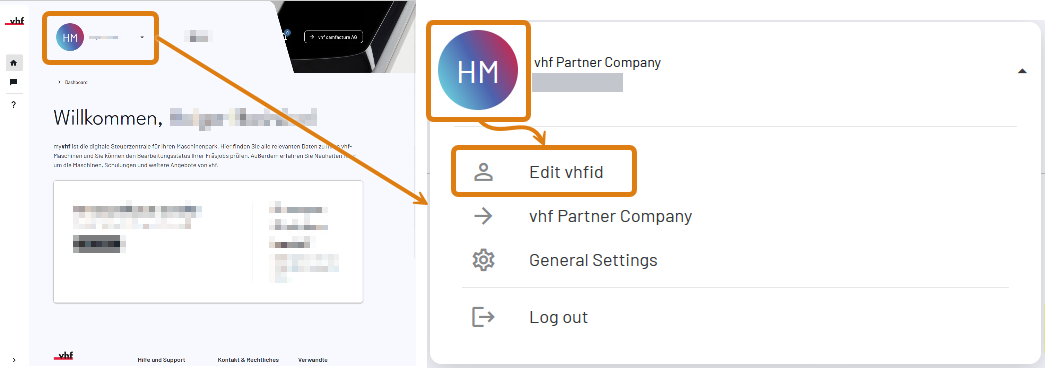
Open the user menu via the user icon at the top.
-
Select the Edit vhfid menu item.
-
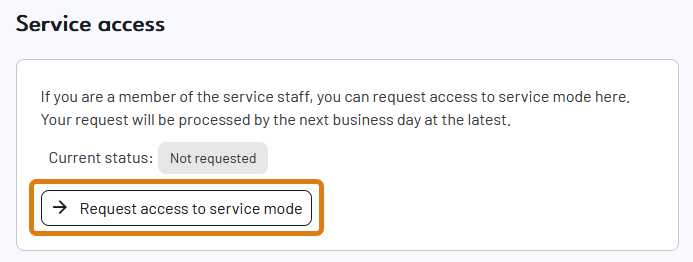
Scroll down to the Service access section.
-
Select the Request access to service mode button.
-
Read the terms and conditions and confirm your acceptance via the check box.
-
Select the Send button.
-
Wait for the unlock confirmation email from vhf.
-
Your vhfid is now marked as service personnel.


