Exchanging the tool magazine inserts
- Your machine comes with tool magazine inserts as spare parts and with the drill tool.
- Additional inserts and drill tools are available via customer service.
-
Have ready:
-
Tool magazine insert
-
Drill tool (provided)
-
-
Open the working chamber door.
-
CAUTION!Wear gloves.
-
Pull the tool magazine out of the working chamber.
-
ATTENTION! Remove all tools from the tool magazine.
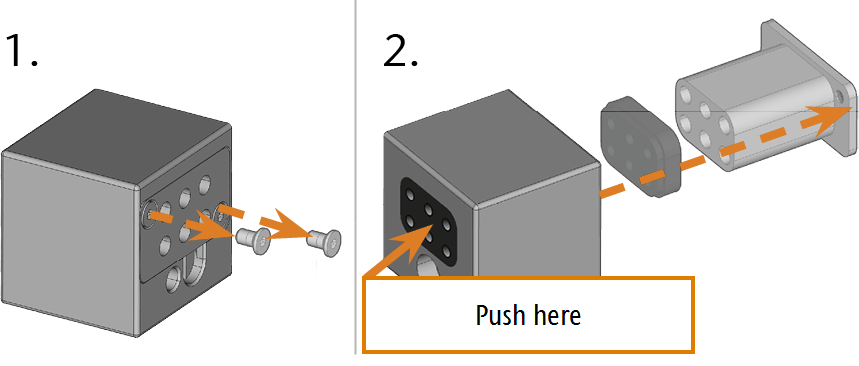
- Remove the screws from the bottom of the tool magazine and put them aside.
- Firmly press against the tool magazine insert.
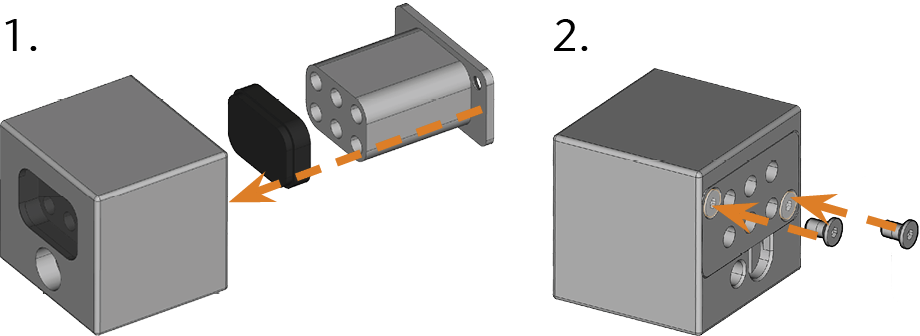
- The insert moves out of the magazine together with its retainer.
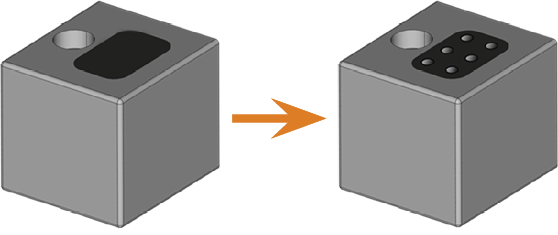
- Insert the new tool magazine insert together with its retainer. Position the insert with the smooth side pointing forwards so that it forms an even surface with the upper side of the tool magazine.
- Insert the screws and screw them down.
- Follow the instructions in the documentation for dentalcnc and drill the tool positions using the provided drill bit.
- Insert the tools into the correct positions of the magazine. Managing tools and tool magazines
- Make sure that the correct tool magazine for the next job is mounted. Attaching and exchanging tool magazines
If tool magazine inserts are worn, exchange them. New inserts are delivered without holes for the tools. The holes must be drilled into the inserts with the machine.
The documentation for the manufacturing software Term for the software package consisting of dentalcam and dentalcnc. contains step-by-step instructions for drilling the holes into the inserts. Below you find a description of how to replace the tool magazine inserts in the machine.
You can replace tool magazine inserts as follows: