Material settings

In the material settings, you define the manufacturing parameters for your blanks. The manufacturing settings are divided into settings for material groups and settings for the subordinate single materials.
Some of these manufacturing settings are default settings and can be overwritten in the Nesting view.
Material groups and single materials
dentalcam offers different manufacturing settings for the various material groups and single materials.
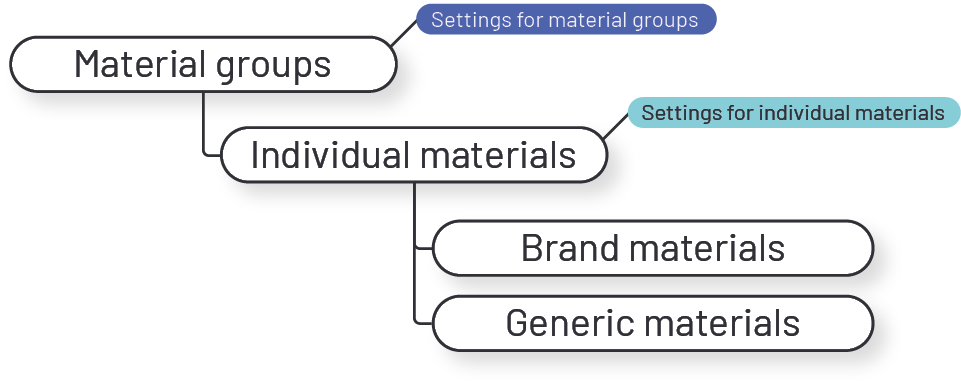
Material groups The material group settings allow you to configure the manufacturing for all types of a material. Example: All PMMA types.
Single materials The settings for single materials allow you to configure additional manufacturing settings for specific material types. dentalcam lists brand materials as well as generic materials.
-
Brand materials Brand materials bear the name assigned by the manufacturer. Example: IPS e.max.
-
Generic materials Generic materials are named after the parent material group. You should always use generic materials for a blank if no brand material exists for that blank in dentalcam . Example: zirconia.
Example: display of material groups and single materials in dentalcam
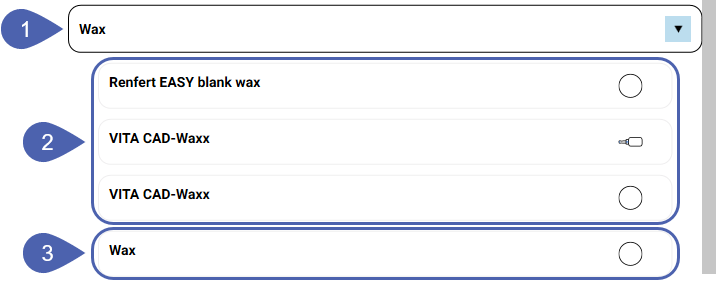
|
1 |
Material group |
|
2 |
Brand materials |
|
3 |
Generic material |
For some materials, you need to distinguish between different material shapes. The icon next to each entry indicates the material shape.

Discs

Blocks

Prefabricated abutments
Example: 2 entries for generic PMMA: top for discs, bottom for blocks.

The material database
The material groups and single materials in dentalcam come from the vhf material database.
If your dentalcam computer is connected to the Internet, dentalcam updates the material database automatically. This happens regardless of new dentalcam versions. However, some updates to the material database also require the latest dentalcam version.


